OpenCode 是一个 100% 开源的code agent,专注于为开发者提供强大、灵活且可扩展的 AI 编程体验。与 Cursor、Copilot 等商业工具不同,OpenCode 不绑定任何特定的 LLM 提供商,支持 Claude、OpenAI、Google、本地模型等多种提供商。
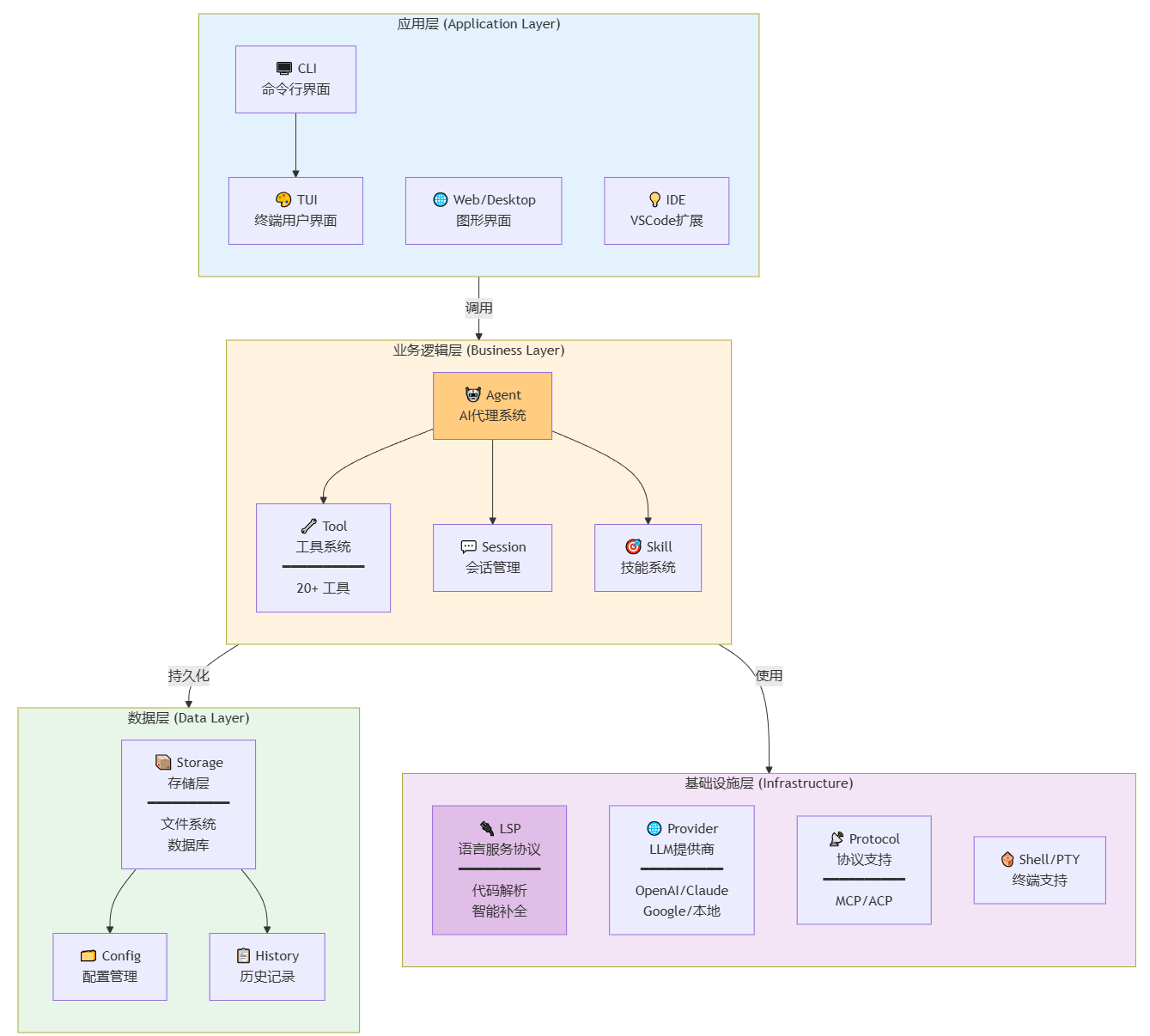
OpenCode 采用现代化的四层架构设计,实现从用户输入到 AI 响应的完整链路:
OpenCode 主要用于以下场景:
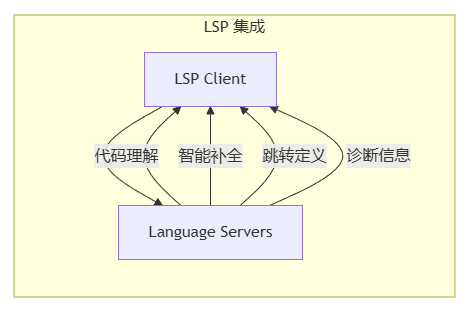
支持的语言(通过 LSP):
TypeScript/JavaScript
Python, Go, Rust
Java, C#, C++
以及 50+ 其他语言
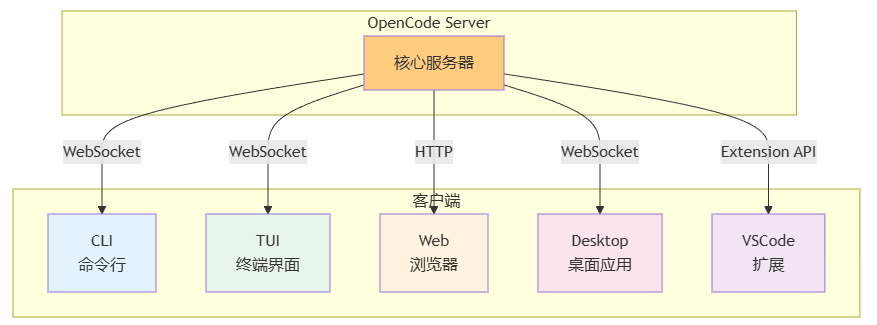
本章介绍 OpenCode 核心组件的类继承层次、关键属性和方法签名。
文件: packages/opencode/src/agent/agent.ts
class Agent {
  /** 代理配置 */
  config: AgentConfig

  /** 当前会话 */
  session: Session

  /** 使用的工具 */
  tools: Tool[]

  /** LLM 提供商 */
  provider: LLMProvider

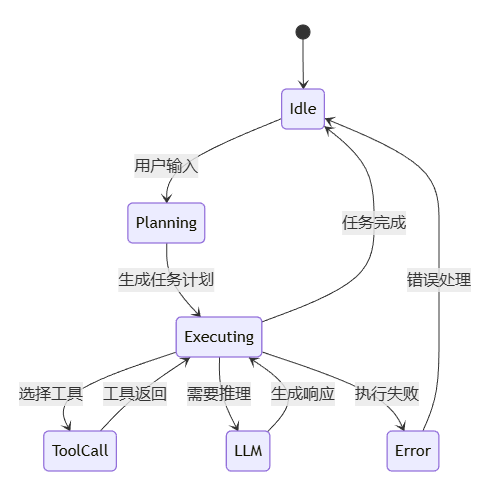
  /** 处理用户输入 */
  async handle(input: string): Promise<AgentResponse>

  /** 规划任务 */
  async plan(query: string): Promise<TaskPlan>

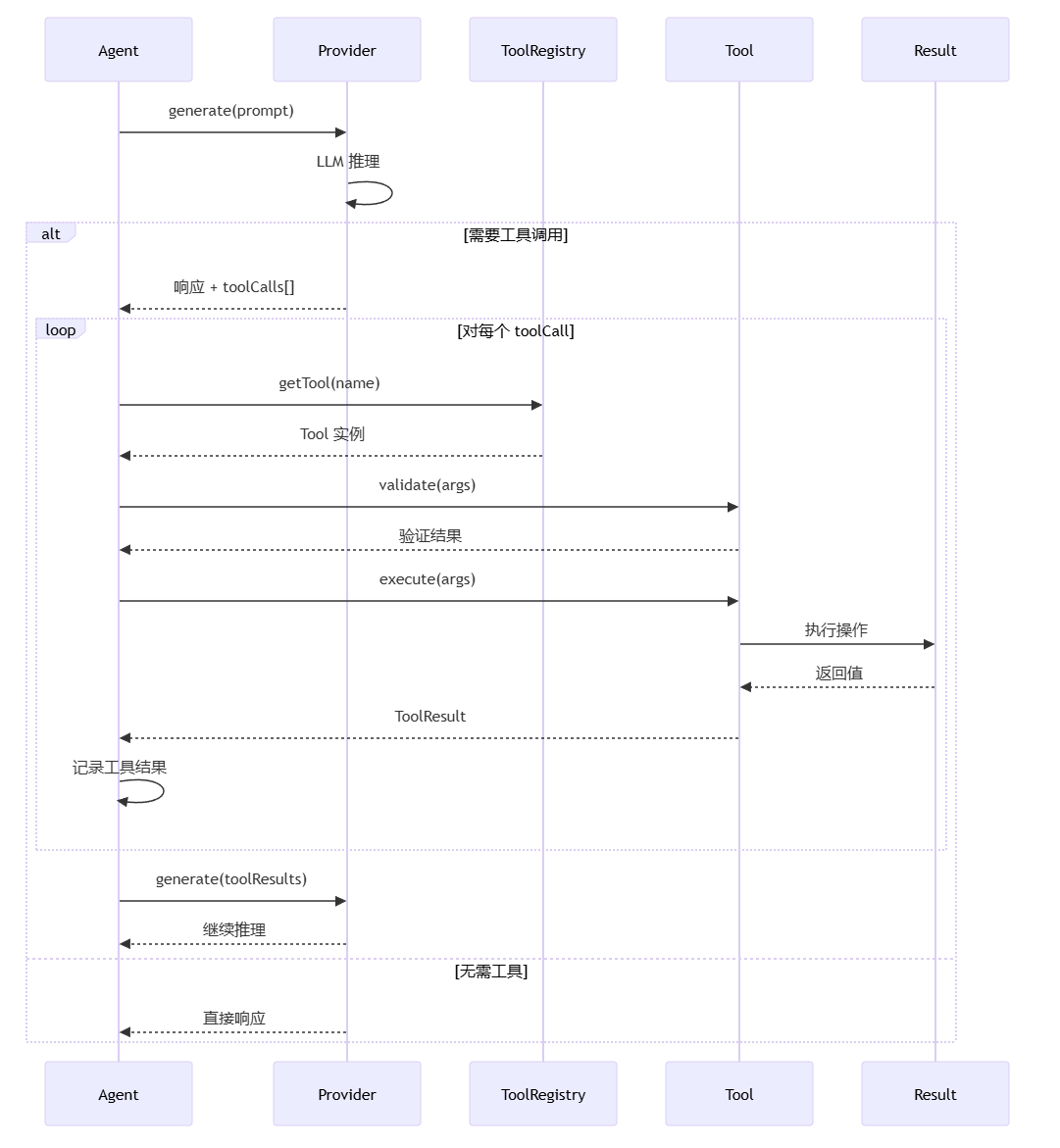
  /** 执行工具 */
  async execute(tool: Tool, args: Args): Promise<ToolResult>
}
async handle(input: string): Promise<AgentResponse> {
  // 1. 解析用户输入
  // 2. 检索相关上下文
  // 3. 调用 LLM 生成响应
  // 4. 执行工具调用
  // 5. 返回结果
}

async plan(query: string): Promise<TaskPlan> {
  // 1. 分析查询意图
  // 2. 分解为子任务
  // 3. 确定工具依赖
  // 4. 生成执行计划
}
文件: packages/opencode/src/tool/tool.ts
Tool (抽象基类)
├── name: string
├── description: string
├── parameters: z.ZodSchema
└── execute(args: Args): Promise<Result>

文件工具类:
├── ReadTool
├── WriteTool
├── EditTool
├── GrepTool
├── GlobTool
└── LSPTool

执行工具类:
├── BashTool
├── PatchTool
└── MultiEditTool

网络工具类:
├── WebSearchTool
└── WebFetchTool

管理工具类:
├── TaskTool
├── TodoTool
└── SkillTool
abstract class Tool<T = any> {
  /** 工具名称 */
  abstract name: string

  /** 工具描述 */
  abstract description: string

  /** 参数 Schema */
  abstract parameters: z.ZodSchema<T>

  /** 执行工具 */
  abstract execute(args: T): Promise<ToolResult>

  /** 验证参数 */
  validate(args: any): args is T {
    return this.parameters.safeParse(args).success
  }
}
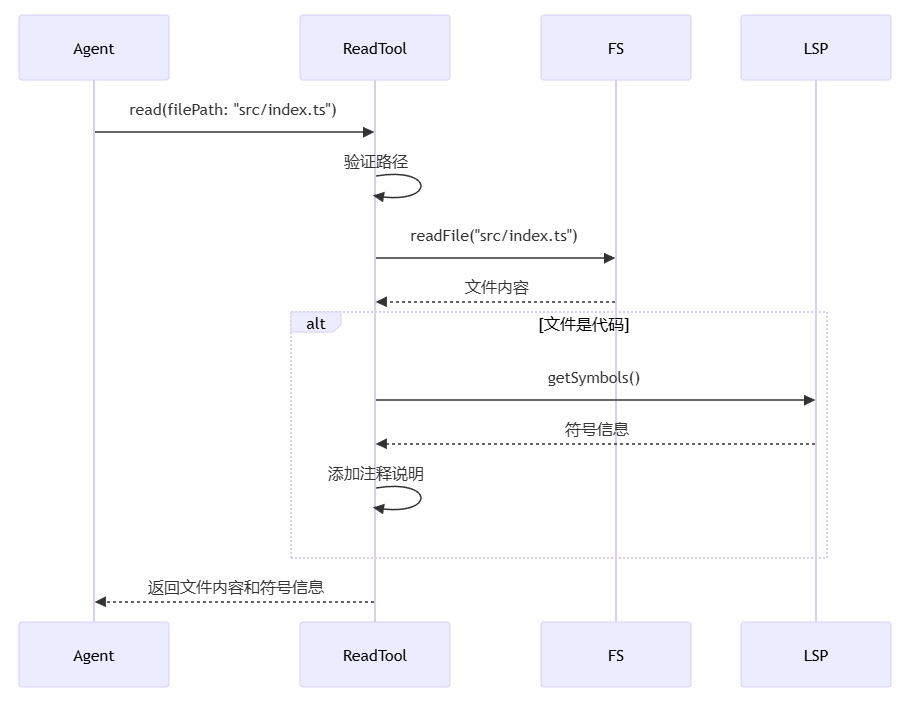
ReadTool:
class ReadTool extends Tool<{filePath: string}> {
  name = "read"
  description = "读取文件内容"
  parameters = z.object({
    filePath: z.string()
  })

  async execute({ filePath }) {
    return await fs.readFile(filePath, 'utf-8')
  }
}
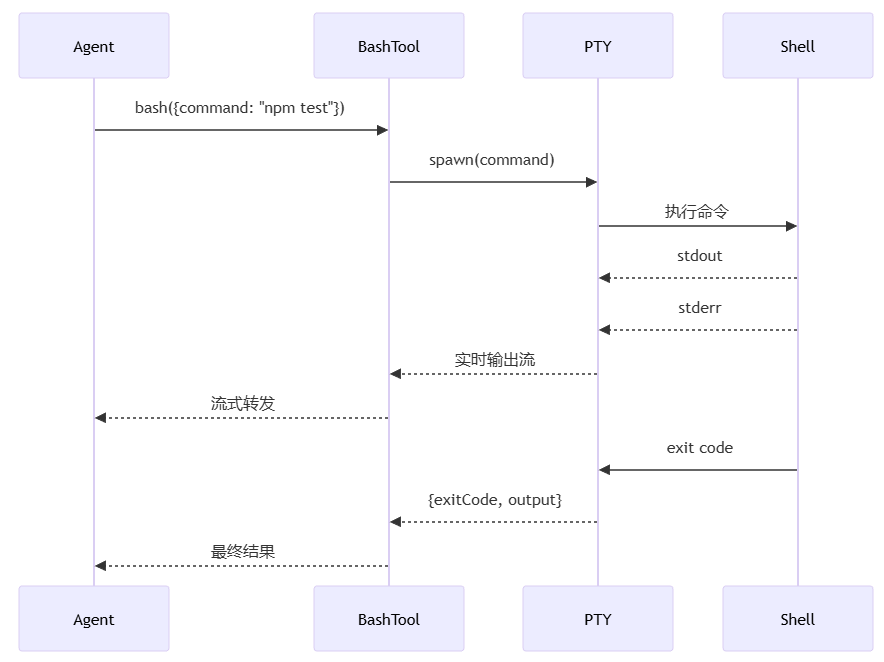
BashTool:
class BashTool extends Tool<{command: string}> {
  name = "bash"
  description = "执行 Bash 命令"
  parameters = z.object({
    command: z.string()
  })

  async execute({ command }) {
    return await this.executeInPTY(command)
  }
}
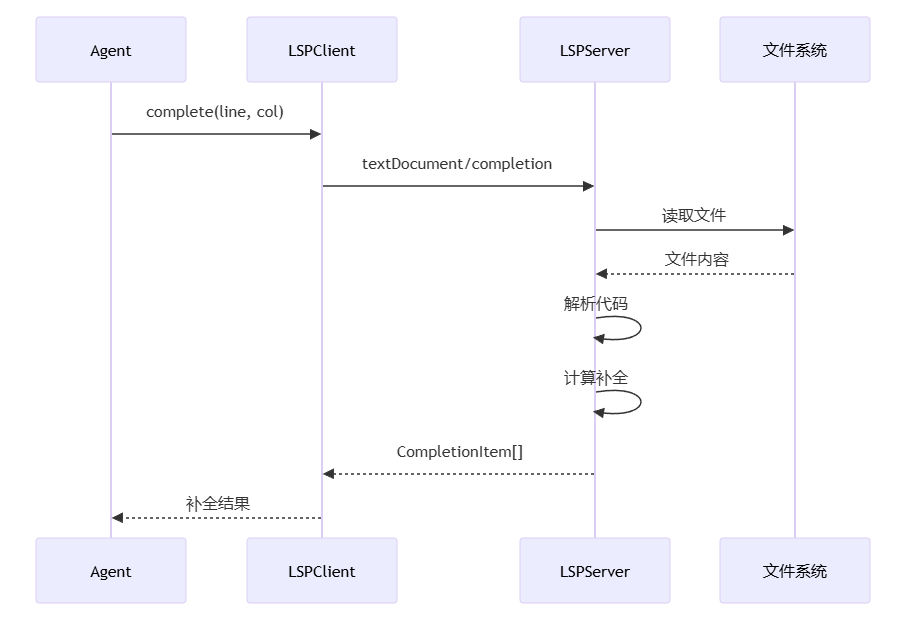
文件: packages/opencode/src/lsp/client.ts
class LSPClient {
  /** 语言服务器进程 */
  private server: ChildProcess | null

  /** RPC 通信 */
  private rpc: JSONRPC

  /** 语言 ID */
  language: string

  /** 连接到语言服务器 */
  async connect(): Promise<void>

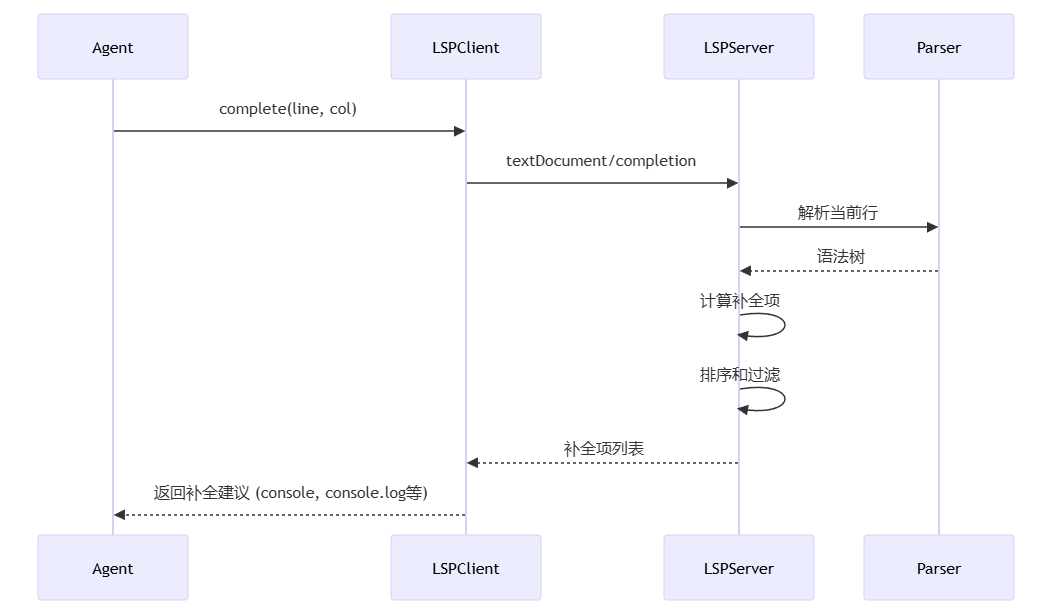
  /** 代码补全 */
  async complete(line: number, column: number): Promise<CompletionItem[]>

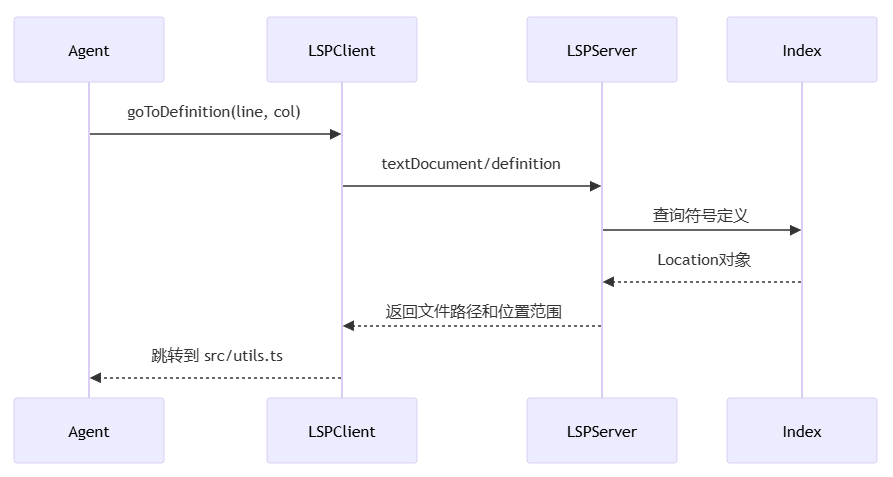
  /** 跳转到定义 */
  async goToDefinition(line: number, column: number): Promise<Location[]>

  /** 获取诊断 */
  async diagnostics(): Promise<Diagnostic[]>
}
文件: packages/opencode/src/provider/
interface LLMProvider {
  /** 提供商名称 */
  name: string

  /** 可用模型 */
  models: string[]

  /** 生成文本 */
  generate(prompt: string, options?: GenerateOptions): Promise<string>

  /** 流式生成 */
  stream(prompt: string, options?: GenerateOptions): AsyncIterable<string>

  /** 计算 token */
  countTokens(text: string): number
}
文件: packages/opencode/src/session/session.ts
class Session {
  /** 会话 ID */
  id: string

  /** 消息历史 */
  messages: Message[]

  /** 上下文文件 */
  contextFiles: string[]

  /** 创建时间 */
  createdAt: Date

  /** 添加消息 */
  add(message: Message): void

  /** 获取历史 */
  getHistory(limit?: number): Message[]

  /** 保存会话 */
  async save(): Promise<void>

  /** 加载会话 */
  static async load(id: string): Promise<Session>
}
type Message =
  | UserMessage     // 用户消息
  | AssistantMessage // AI 响应
  | ToolMessage     // 工具调用
  | SystemMessage   // 系统消息

interface UserMessage {
  role: 'user'
  content: string
}

interface AssistantMessage {
  role: 'assistant'
  content: string
  toolCalls?: ToolCall[]
}

interface ToolMessage {
  role: 'tool'
  toolCallId: string
  content: string
}
文件: packages/opencode/src/storage/storage.ts
class Storage {
  /** 存储目录 */
  private dir: string

  /** 保存会话 */
  async saveSession(session: Session): Promise<void>

  /** 加载会话 */
  async loadSession(id: string): Promise<Session | null>

  /** 列出会话 */
  async listSessions(): Promise<SessionInfo[]>

  /** 保存配置 */
  async saveConfig(config: Config): Promise<void>

  /** 加载配置 */
  async loadConfig(): Promise<Config>
}
~/.opencode/
├── sessions/           # 会话存储
│   ├── {session-id}/
│   │   ├── messages.json
│   │   └── metadata.json
├── config/             # 配置文件
│   ├── global.json
│   └── project.json
└── cache/              # 缓存
    ├── embeddings/
    └── index/
本章展示完整的端到端调用链,包含方法参数、返回值和内部逻辑。
用户与 OpenCode 的交互遵循以下流程:
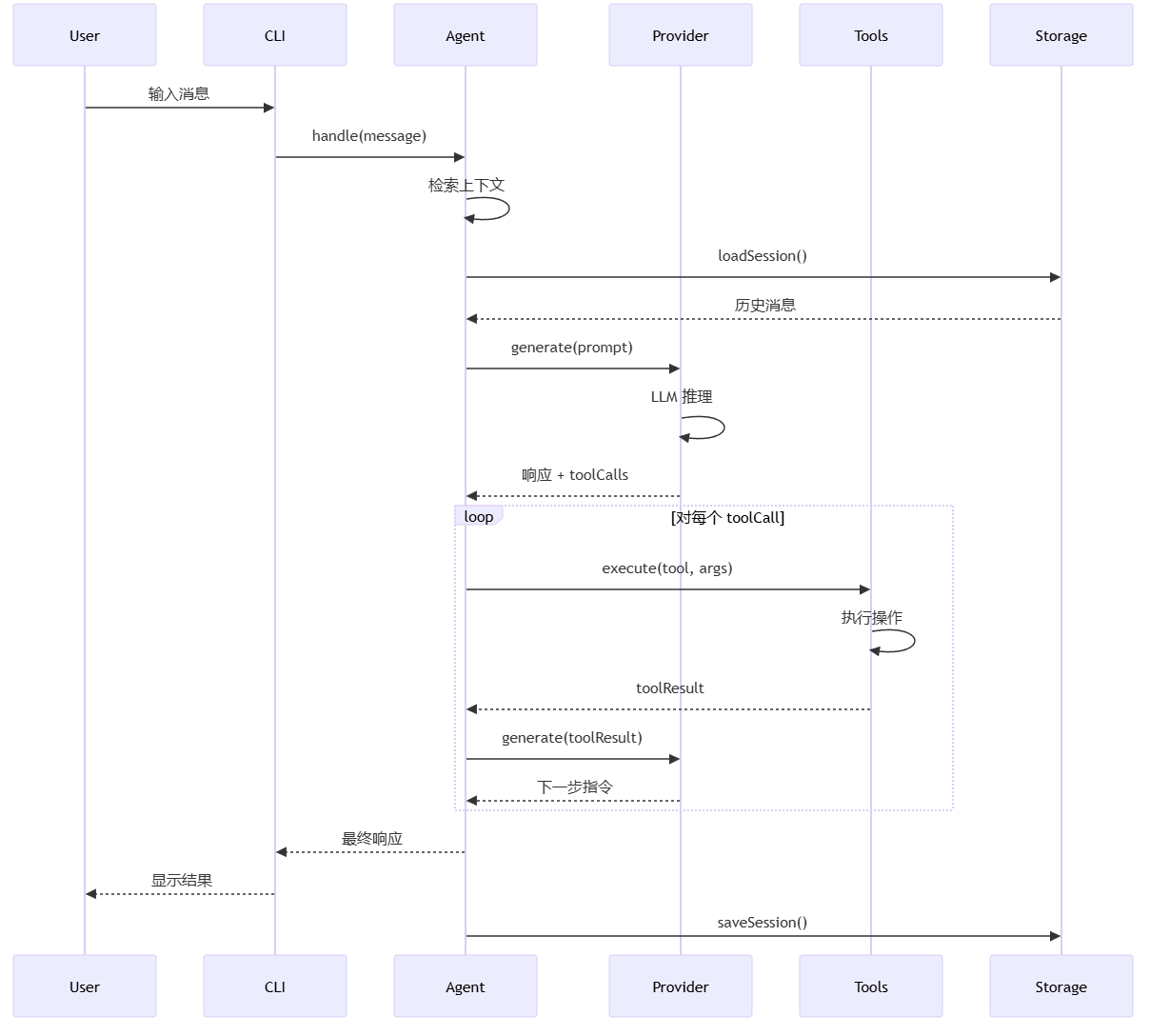
用户输入: 用户通过 CLI/TUI/Web 输入消息
上下文检索: Agent 加载会话历史和相关文件
LLM 推理: 调用 Provider 生成响应和工具调用
工具执行: 执行 LLM 返回的工具调用
迭代处理: 将工具结果反馈给 LLM,继续推理
返回结果: 向用户展示最终响应
持久化: 保存会话到存储
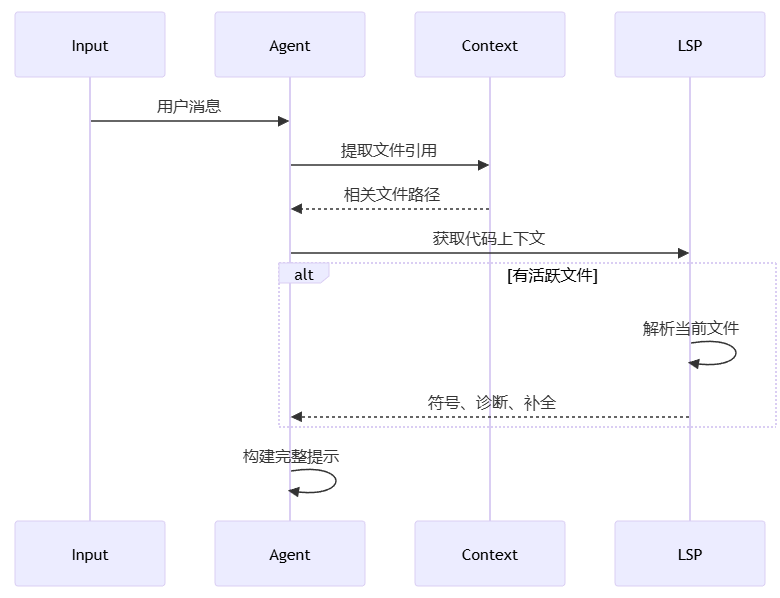
关键代码:
async handle(input: string) {
  // 1. 提取文件引用 (@file.ts)
  const files = this.extractFileReferences(input)

  // 2. 获取 LSP 上下文
  const lspContext = await this.getLSPContext(files)

  // 3. 构建提示
  const prompt = this.buildPrompt(input, {
    files,
    lspContext,
    history: this.session.getHistory()
  })

  // 4. 调用 LLM
  return await this.provider.generate(prompt)
}
interface AgentConfig {
  /** 使用的模型 */
  model: string

  /** 温度参数 */
  temperature?: number

  /** 最大 token 数 */
  maxTokens?: number

  /** 系统提示 */
  systemPrompt?: string

  /** 可用工具 */
  tools: string[]

  /** 权限级别 */
  permissions: 'read' | 'write' | 'full'
}
type Message = UserMessage | AssistantMessage | ToolMessage | SystemMessage

interface UserMessage {
  id: string
  role: 'user'
  content: string
  timestamp: Date
}

interface AssistantMessage {
  id: string
  role: 'assistant'
  content: string
  toolCalls?: ToolCall[]
  timestamp: Date
}

interface ToolMessage {
  id: string
  role: 'tool'
  toolCallId: string
  toolName: string
  content: string
  timestamp: Date
}
interface ToolCall {
  /** 调用 ID */
  id: string

  /** 工具名称 */
  name: string

  /** 工具参数 */
  arguments: Record<string, any>

  /** 执行结果 */
  result?: ToolResult

  /** 执行状态 */
  status: 'pending' | 'running' | 'success' | 'error'
}
interface ToolResult {
  /** 是否成功 */
  success: boolean

  /** 返回数据 */
  data: any

  /** 错误信息 */
  error?: string

  /** 执行时长 */
  duration: number
}
interface Session {
  /** 会话 ID */
  id: string

  /** 会话名称 */
  name?: string

  /** 消息历史 */
  messages: Message[]

  /** 上下文文件 */
  contextFiles: string[]

  /** Agent 配置 */
  config: AgentConfig

  /** 创建时间 */
  createdAt: Date

  /** 更新时间 */
  updatedAt: Date
}
# 安装
bun install -g opencode

# 启动交互式会话
opencode run

# 使用特定模型
opencode run --model claude-3-5-sonnet

# 单次查询
opencode ask "如何实现快速排序?"

# 读取文件并询问
opencode ask "@src/utils.ts 这个函数是做什么的?"
import { Agent } from '@opencode-ai/opencode'
import { OpenAIProvider } from '@opencode-ai/opencode/provider'

// 创建 Agent
const agent = new Agent({
  provider: new OpenAIProvider({ apiKey: '...' }),
  model: 'gpt-4',
  tools: ['read', 'write', 'bash', 'lsp']
})

// 处理用户输入
const response = await agent.handle('帮我写一个快速排序函数')

console.log(response.content)